Bamboo Space: Zen Launcher
- 4.8
- Rating
- 10.00K
- Installs
- Free
- Price

 Analysis by App-foxy
I came away from Bamboo Space: Zen Launcher feeling that it is trying to make the phone itself calmer, not simply add another game to a crowded home screen. Vista Cosmos combines a minimalist launcher with a small Zen Mahjong experience, so the appeal is split between practical customization and quiet, casual play. That unusual combination is the main reason to consider it: this is less about chasing a high score and more about creating a softer space to return to during the day.
The app is free and aimed at everyone, which makes it easy to try without treating the download as a major commitment. It belongs to the casual game category, although its launcher tools give it a more useful everyday role than a typical pick-up-and-play title. I would recommend it to someone who likes uncluttered screens, gentle visual themes, and short sessions. I would be more cautious with it if you want a full-featured replacement for a conventional Android launcher or a deep Mahjong game with extensive progression.
How Bamboo Space feels in current use
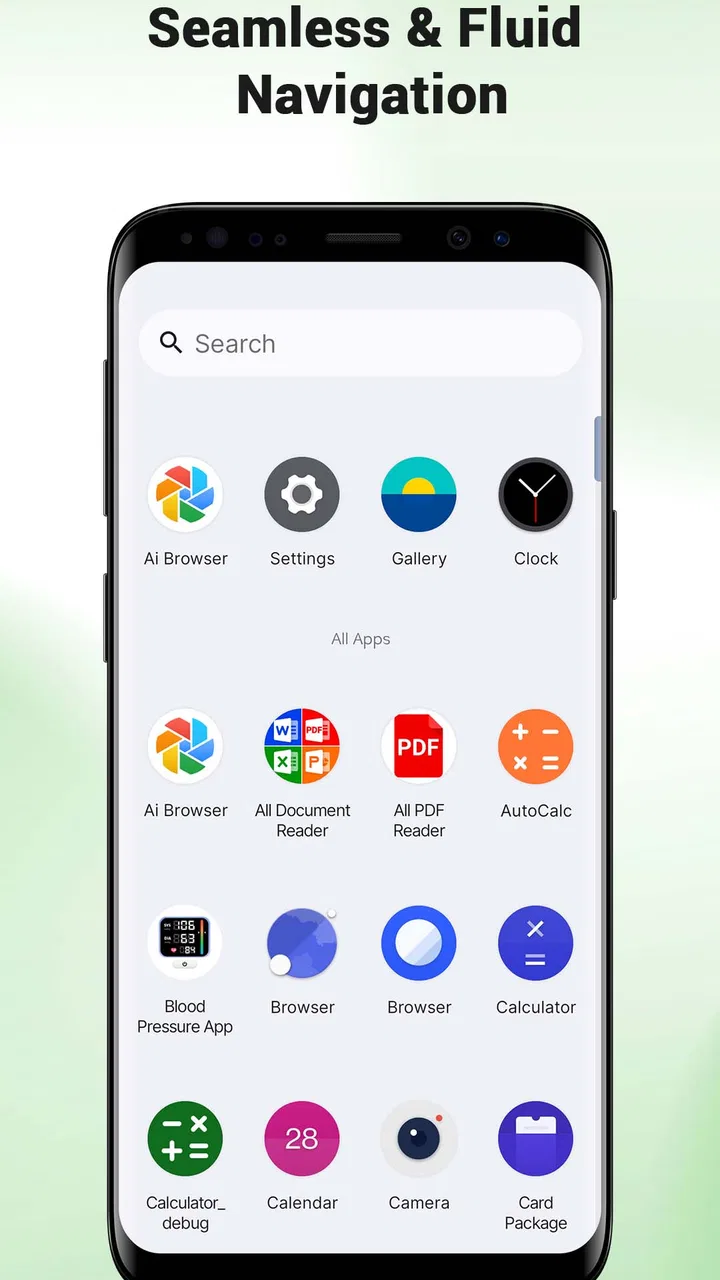
The first thing I noticed is the change in rhythm. Most launchers encourage quick scanning: rows of colorful icons, several widgets, and notifications competing for attention. Bamboo Space takes the opposite approach by putting emphasis on icon shapes, wallpapers, and the Zen Mahjong activity. That creates a more deliberate experience. Opening the phone feels less like entering a busy dashboard and more like stepping into a small themed environment.
You May Also Like

 AccuWeather: Weather Radar
AccuWeather Review: A Quick, Clear Forecast for Everyday Decisions
For everyday plans, the best forecast is the one you can understand quickly. AccuWeather makes rain timing, radar, and local conditions easy to act on, with a few trade-offs.

 Hill Climb Racing
Why Hill Climb Racing Still Turns Crashes Into One More Run
A tiny car, a bumpy hill and one more upgrade: Hill Climb Racing keeps resurfacing because its simple chaos makes every near-miss feel personal.

 AliExpress - Shopping App
AliExpress Makes Global Shopping Feel Personal, but Shoppers Bear the Risk
AliExpress turns a global marketplace into a pocket-sized discovery engine. Its reach is useful, its shopping loop compelling, and its trade-offs easy to miss.

 Lords Mobile: Kingdom Wars
Lords Mobile Is a Kingdom-Building Routine, Not a Quick Match
A case-by-case verdict on the building, battles, device demands, and social commitments that make Lords Mobile rewarding for some players and exhausting for others.

 PDF Scanner app - TapScanner
TapScanner Makes Paperwork Easier to Capture, Check, and Share
TapScanner makes scanning with a phone feel less like a rescue operation and more like a dependable step in getting work done. Its capture tools are useful, though not flawless.

 Block Blast!
 Shows How Much a Puzzle Game Can Leave Out
A quiet grid game shows why puzzle players increasingly value instant clarity, repeatable skill and low-pressure play—and where the genre still needs to catch up.
More From Our News Desk
View All News


The minimalist idea works best when you already know which apps you use most. A restrained home screen can make frequent actions feel cleaner, but it also asks you to accept fewer visual clues. If you rely on bright, familiar app icons to find everything instantly, the change may slow you down at first. I found that the launcher concept makes more sense when I treated the home screen as a focused starting point rather than a complete storage area for every installed app.
The icon-shape customization is a practical touch rather than a decorative extra. Shape changes can make a group of mismatched icons feel more consistent, especially on a simple wallpaper. The result depends heavily on the icons and layout already on your phone, so I would not expect every application to become perfectly uniform. Still, the option is useful for anyone who dislikes the visual noise created by unrelated icon designs.
Wallpapers matter more here than they do in a conventional launcher because the whole presentation depends on empty space and atmosphere. A busy background would undermine the concept, while a restrained one supports the feeling of a quiet digital room. My advice is to choose the wallpaper before adjusting the icons. That gives you a visual base and prevents the customization process from becoming a random collection of small changes.
Zen Mahjong is a companion, not the whole product
The Mahjong element gives the launcher a reason to linger. Instead of opening the phone only to jump into another app, you have a casual activity that fits the same calm theme. I see it as a short mental break: useful while waiting for a kettle to boil, taking a pause between tasks, or winding down before putting the phone away.
That positioning is also its clearest limitation. Players looking for a large Mahjong package may prefer a dedicated title built around many modes, detailed progression, competitive systems, or a broader collection of puzzles. Bamboo Space is more appealing when you want the game and the interface to feel connected. It is not the strongest choice if the game itself is the only thing you care about.
The combination can be especially effective for people who use their phone in small bursts. A conventional launcher gets you to an app quickly, while this one adds a little breathing room before the next task. The trade-off is that the visual calm may feel slower than a highly optimized productivity launcher. That is not necessarily a flaw, but it is a deliberate choice you should understand before making it your default.
What the current release tells me
The current version is 1.2.0, and the product was released on May 14, 2026. Those details place the app in an early stage of its life rather than suggesting a long-established customization platform. I would read the present release as a foundation: the central identity is already clear, but the long-term value will depend on how Vista Cosmos develops the launcher and the Mahjong side together.
There is a useful distinction between what is already visible and what I would merely hope to see later. The current appeal comes from the existing mix of icon shapes, wallpapers, and Zen Mahjong. It would be reasonable to want more refinement over time, but I would not treat possible future additions as part of the product today. For a download decision, I would judge it on the quiet launcher concept that is available now.
The app supports devices running Android 8.0 or later, which keeps it accessible to people using older compatible phones as well as newer models. That broad reach is helpful for a launcher because replacing a home screen is often something users want to do without buying a new device. At the same time, older hardware can make any interface change feel more noticeable, so I would test it during normal use before committing to it as the permanent default.
Its early public response is encouraging: the game has a 4.8 average from around eighty ratings, with fifteen written reviews and over ten thousand installs. I would take that as a positive signal of initial interest, not as proof that it will suit every launcher preference. A small, enthusiastic audience can confirm that the concept works for some people while still leaving open questions about long-term customization depth and update consistency.
How the change affects an existing home screen
Switching launchers is more personal than installing an ordinary casual game. Your home-screen arrangement is part of your daily muscle memory, so I recommend taking a quick snapshot of your current layout before experimenting. That simple step makes it easier to return to your previous setup if the minimalist approach does not fit your routine.
I would begin with one uncluttered home screen rather than trying to redesign the entire phone at once. Keep only the applications you open repeatedly, apply a restrained icon shape, and choose a background that leaves enough contrast for labels. This workflow lets you evaluate the real effect of the launcher without confusing a dramatic visual change with improved usability.
A useful test is to use the phone normally for a full working day. Notice whether you reach your messaging, camera, maps, and other regular tools faster or slower. Also pay attention to accidental taps. A sparse layout can reduce distraction, but if you keep searching for less-used applications, the minimal design may be working against you. The right setup should lower friction, not merely look attractive in a screenshot.
For someone who already uses a carefully organized launcher, Bamboo Space may not feel like an upgrade in efficiency. Its advantage is mood and simplicity. If your current setup is overloaded with folders and widgets, however, the change can be refreshing. I would describe it as a reset button for the phone’s visual environment rather than a universal replacement for every launcher style.
Small workflows that make the concept more useful
One non-obvious way to use it is as a boundary between work and rest. During the day, keep a compact set of essential tools visible. Later, let the calm wallpaper and the Zen Mahjong option become part of a short wind-down routine. The value is not in turning the phone into a wellness device; it is in making the transition between tasks more intentional.
Another practical approach is to treat icon shapes as a visual filter. Instead of changing everything repeatedly, use one shape to distinguish the apps you want to keep within easy reach from the rest of your phone. This can help create a simple hierarchy without filling the screen with folders. It is a subtle use of customization, but it makes the launcher feel more purposeful than a purely cosmetic theme.
I also found that the game component is better used as a stopping point than as an endless distraction. Open it when you genuinely have a few quiet minutes, then close the phone when the break is over. That approach fits the Zen identity and avoids turning a calm launcher into another source of automatic scrolling. People who prefer fast, competitive sessions may find this too gentle, while those who want a softer pause may appreciate the restraint.
There is a trade-off between a clean screen and discoverability. I would keep one familiar gesture or shortcut available for less-used applications rather than hiding everything behind the minimalist presentation. A beautiful home screen is not successful if it forces you to remember too much. The best result comes from combining the calm visual layer with a practical way to reach the apps that do not deserve permanent space.
Where it still falls short
The biggest gap is depth. The store summary establishes a focused set of ideas, but users who expect a complete launcher suite may look for more control over layout, organization, widgets, or automation. I would not choose Bamboo Space as my only launcher if advanced customization is the main reason I am changing my home screen. A mature launcher alternative will usually be better for detailed control and highly specific workflows.
The same issue applies to Mahjong. The Zen presentation is appealing, but casual players who want a substantial standalone game should compare it with dedicated Mahjong applications before settling in. Bamboo Space makes sense when the game is part of the atmosphere. It makes less sense when you want a broad game library, a strong achievement structure, or a long-term competitive goal.
There is also a learning curve caused by the very simplicity that makes the app attractive. A conventional launcher often explains itself through familiar patterns: a dense grid, visible folders, and standard navigation. A minimalist design can require more personal setup. I would give it time rather than judging it after one glance, but I would also avoid forcing it on someone who values immediate access over visual calm.
Because the current release is still relatively early, I would keep expectations measured around evolution. Version 1.2.0 shows that the product has already moved beyond its first release, but one version number cannot tell me how extensive future changes will be. The sensible approach is to enjoy the present feature set and watch whether later updates improve everyday convenience without losing the quiet character that makes the app distinctive.
Who should install it, and who should skip it
I think it is a strong match for Android users who want their phone to feel less busy, enjoy gentle casual games, and like the idea of matching the home screen to a single visual mood. It is also worth trying if your current launcher has become cluttered and you want a simple reset without paying for the experiment. The everyone age rating makes it approachable for a broad household audience.
I would suggest skipping it if your priority is maximum productivity, extensive home-screen engineering, or a deep Mahjong challenge. People who depend on many widgets, complex folders, or tightly optimized shortcuts may find the minimalist approach restrictive. Likewise, dedicated Mahjong players may enjoy the game more in an application designed exclusively around that genre.
The free price removes one important barrier, but it does not remove the need to judge the fit. A launcher becomes part of your daily routine, so convenience matters more than the fact that it costs nothing. Try the visual changes with a modest layout first, and decide based on whether the phone feels easier to use after several ordinary tasks.
What I would watch as Vista Cosmos continues
For future development, I would pay attention to whether the launcher gains more practical flexibility while preserving its calm identity. The most valuable improvements would be the ones that help users balance simplicity with quick access, rather than adding options merely for the sake of a longer feature list. The product has a clear personality; its challenge is to grow without becoming another crowded customization tool.
I would also watch how closely the Mahjong experience continues to support the launcher concept. If the two parts remain visually and emotionally connected, Bamboo Space can occupy a distinctive place between a casual game and a home-screen utility. If they develop in unrelated directions, the app may feel like two small products sharing one package.
My current view is positive but specific: this is a thoughtful choice for a calmer phone, not a universal launcher or a full Mahjong replacement. Vista Cosmos has created something recognizable with Bamboo Space: Zen Launcher, and the 4.8 average from its early audience suggests that the idea is resonating. I would recommend trying it if you value atmosphere and short, peaceful interactions. Just approach it as a focused experience, keep your expectations realistic, and give the minimalist layout enough everyday testing to see whether it genuinely improves your routine.
FAQs for Bamboo Space: Zen Launcher
01What is Bamboo Space: Zen Launcher?
Bamboo Space: Zen Launcher is a minimalist and intuitive launcher designed to bring a sense of calm and organization to your smartphone. It's crafted to reduce clutter and enhance productivity by offering a clean interface and easy access to your most-used apps. Perfect for users seeking a serene digital experience.
02How does Bamboo Space: Zen Launcher improve productivity?
Bamboo Space: Zen Launcher improves productivity by providing a straightforward interface that eliminates distractions. It organizes apps neatly and offers customizable widgets for quick access to essential functions, allowing users to focus on important tasks without getting overwhelmed by unnecessary app icons or notifications.
03Is Bamboo Space: Zen Launcher customizable?
Yes, Bamboo Space: Zen Launcher is highly customizable. Users can select from various themes, adjust icon sizes, and choose from a range of widgets to personalize their home screen. This flexibility ensures that you can tailor the launcher to fit your aesthetic preferences and functional needs.
04Does Bamboo Space: Zen Launcher affect phone performance?
Bamboo Space: Zen Launcher is designed to be lightweight and efficient, minimizing its impact on phone performance. It uses minimal resources, ensuring that your device remains fast and responsive. However, as with any app, device performance can vary based on specific hardware and software configurations.
05Is Bamboo Space: Zen Launcher available for both Android and iOS?
Currently, Bamboo Space: Zen Launcher is available for Android devices. There is ongoing development to expand its availability to iOS, but as of now, iOS users will need to wait for future updates. Android users can download it directly from the Google Play Store.
Pros
- Intuitive interface with smooth navigation.
- Customizable themes for personalization.
- Low battery consumption for longer use.
- Fast app launch speeds enhance productivity.
- Supports widgets for quick access to tools.
Cons
- Limited free features without upgrade.
- Occasional ads may disrupt user experience.
- Some themes require premium purchase.
- Compatibility issues on older devices.
- Limited support for third-party widgets.

Bamboo Space: Zen Launcher
Gallery